Skip to content

See what your child's coach sees.

After practice, your child's coach sends their notes, in the coach's own words, with what to work on this week and a drill to try at home. You read them in the Coach Sidekick app, once the coach has checked them.

Coach Sidekick comes through your child's club. If your club doesn't use it yet, the email opens ready to send.

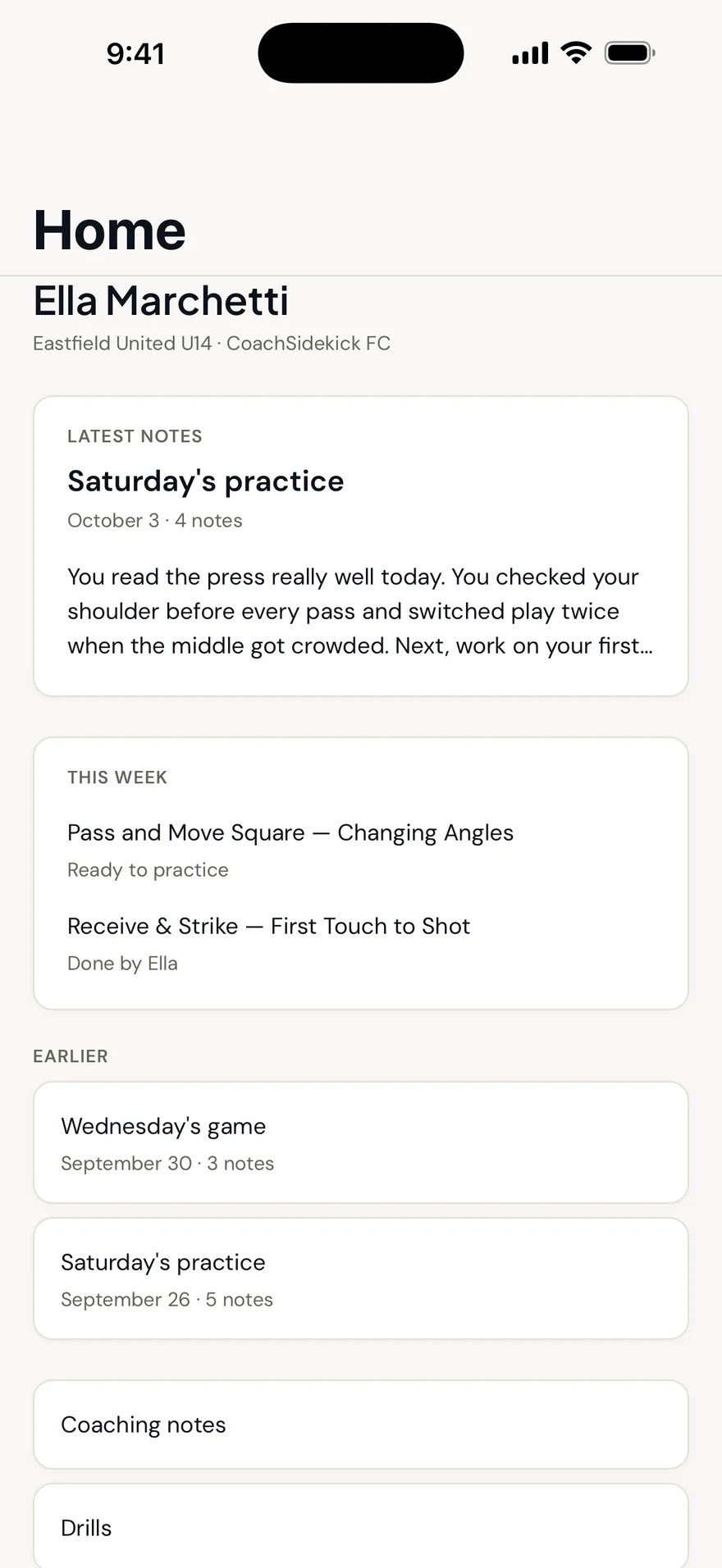
The family home screen in the Coach Sidekick app: the latest coaching note from Saturday's practice, and this week's drills.

Real family screen from the iPhone app, with a demo player.

Words, not scores.

What reaches you is what the coach saw in your child, in the coach's words. It's built to help families support practice at home, not to grade a child.
  • The coach's own words.

    Not a rating or a generated report card. What the coach actually said to your child, from the session it was said in.

  • Checked before you see it.

    The coach reads every note first and can edit or remove anything. Monthly reports go through the same review.

  • Only your child.

    You see your own child's notes and nobody else's. There's no shared parent feed.

  • No scores or rankings for families.

    You see your own child's notes. Nothing you see turns your child into a number or compares them with teammates.

One note, all the way to your phone.

Follow one piece of feedback from Tuesday's practice: what Ella did, what her coach said, how it was checked, and how it reached her family with something to practise.

Ella Marchetti, 8

Said to Ella, during the switching drill

TechnicalPre-Receive ScanningSwitching the Point of Attack

For Ella, from Tuesday's practice

Check your shoulder before it comes. Then switch it.

ApprovedEditReassign

To Ella, Tuesday evening

“Check your shoulder before it comes. Then switch it.”

This week

Receive & Strike: First Touch to Shot

Done by Ella, Thursday

Coached thread on Ella's record

Pre-Receive Scanning

  1. Tuesday, correction“Check your shoulder before it comes.”
  2. Saturday, praise“That's it, Ella. You read the press.”

Example player. Step 7 is a real screen from the family app.

Something to do this week.

Each note comes with a drill matched to what the coach said, small enough for a garden or a park. Your child can tick it off, and you can log the days they practised.

Ella's drill this week

Receive & Strike: First Touch to Shot

12 minutes, on her own, with a wall or a small goal

What to focus on

  • First touch a foot or two to the side, into your shooting stride.
  • Open your body as the ball arrives, so you're already facing the target.

Done by Ella

Practice at home

Logged twice this week

  • M
  • T
  • W
  • T
  • F
  • S
  • S

The coach's monthly report to your family includes practice at home, and the coach reviews it before it's sent.

A real drill from the Coach Sidekick library, with a demo player.

Your child's data, in your hands.

From the family app or the web, you can see what we hold about your child and decide what happens to it. No emails to chase, no forms.

How we handle young players' data
  • See everything we hold about your childNotes, sessions and the details on their profile.
  • Consent historyWhen consent was given, and by whom.
  • Withdraw consentStop new information being collected.
  • Request deletionAsk for your child's data to be deleted.

Questions parents ask.

How do we get it?
Through your child's club. When the club uses Coach Sidekick, they invite you, and you sign in to the app or on the web. If they don't use it yet, send your director the email from this page.
Will I see other children's notes?
No. Each family sees only their own child. There's no leaderboard and no comparison with teammates.
Is everything the coach says sent to us?
Only what the coach approves. They can edit or remove anything before it's released, and private conversations can simply stay off the recording.
My teenager might not want me reading everything.
That's worth talking through together, and your club can set up family access in the way that works for you. We design for support, not surveillance.
Is there an Android app?
Not yet. On Android, everything is available on the web from your phone's browser.
Where can I read about privacy?
Our youth data page explains what we hold and how you control it, and the privacy policy has the detail.

Already invited by your club?

Get the app and sign in with the email your club used. If your club isn't on Coach Sidekick yet, your director is the person to ask.